{
"cells": [
{
"cell_type": "markdown",
"metadata": {},
"source": [
"# Deploying Bokeh Apps"
]
},
{
"cell_type": "code",
"execution_count": null,
"metadata": {},
"outputs": [],
"source": [
"import numpy as np\n",
"import holoviews as hv\n",
"hv.extension('bokeh')"
]
},
{
"cell_type": "markdown",
"metadata": {},
"source": [
"## Purpose\n",
"\n",
"HoloViews is an incredibly convenient way of working interactively and exploratively within a notebook or commandline context. However, once you have implemented a polished interactive dashboard or some other complex interactive visualization, you will often want to deploy it outside the notebook to share with others who may not be comfortable with the notebook interface. \n",
"\n",
"In the simplest case, to visualize some HoloViews container or element `obj`, you can export it to a standalone HTML file for sharing using the `save` method of the Bokeh renderer:\n",
"\n",
"```\n",
"hv.renderer('bokeh').save(obj,'out')\n",
"```\n",
"\n",
"This command will generate a file `out.html` that you can put on any web server, email directly to colleagues, etc.; it is fully self-contained and does not require any Python server to be installed or running. \n",
"\n",
"Unfortunately, a static approach like this cannot support any HoloViews object that uses DynamicMap (either directly or via operations that return DynamicMaps like `decimate`, `datashade`, and `rasterize`). Anything with DynamicMap requires a live, running Python server to dynamically select and provide the data for the various parameters that can be selected by the user. Luckily, when you need a live Python process during the visualization, the [Bokeh server](http://bokeh.pydata.org/en/latest/docs/user_guide/server.html) provides a very convenient way of deploying HoloViews plots and interactive dashboards in a scalable and flexible manner. The Bokeh server allows all the usual interactions that HoloViews lets you define and more including:\n",
"\n",
"* responding to plot events and tool interactions via [Linked Streams](./12-Custom_Interactivity.ipynb)\n",
"* generating and interacting with plots via the usual widgets that HoloViews supports for HoloMap and DynamicMap objects.\n",
"* using periodic and timeout events to drive plot updates\n",
"* combining HoloViews plots with custom Bokeh plots to quickly write highly customized apps.\n",
"\n",
"## Overview\n",
"\n",
"In this guide we will cover how we can deploy a Bokeh app from a HoloViews plot in a number of different ways:\n",
"\n",
"1. Inline from within the Jupyter notebook\n",
"\n",
"2. Starting a server interactively and open it in a new browser window.\n",
"\n",
"3. From a standalone script file\n",
"\n",
"4. Combining HoloViews and Bokeh models to create a more customized app\n",
"\n",
"If you have read a bit about HoloViews you will know that HoloViews objects are not themselves plots, instead they contain sufficient data and metadata allowing them to be rendered automatically in a notebook context. In other words, when a HoloViews object is evaluated a backend specific ``Renderer`` converts the HoloViews object into Bokeh models, a Matplotlib figure or a Plotly graph. This intermediate representation is then rendered as an image or as HTML with associated Javascript, which is what ends up being displayed.\n",
"\n",
"## The workflow\n",
"\n",
"The most convenient way to work with HoloViews is to iteratively improve a visualization in the notebook. Once you have developed a visualization or dashboard that you would like to deploy you can use the ``BokehRenderer`` to export the visualization as illustrated above, or you can deploy it as a Bokeh server app. \n",
"\n",
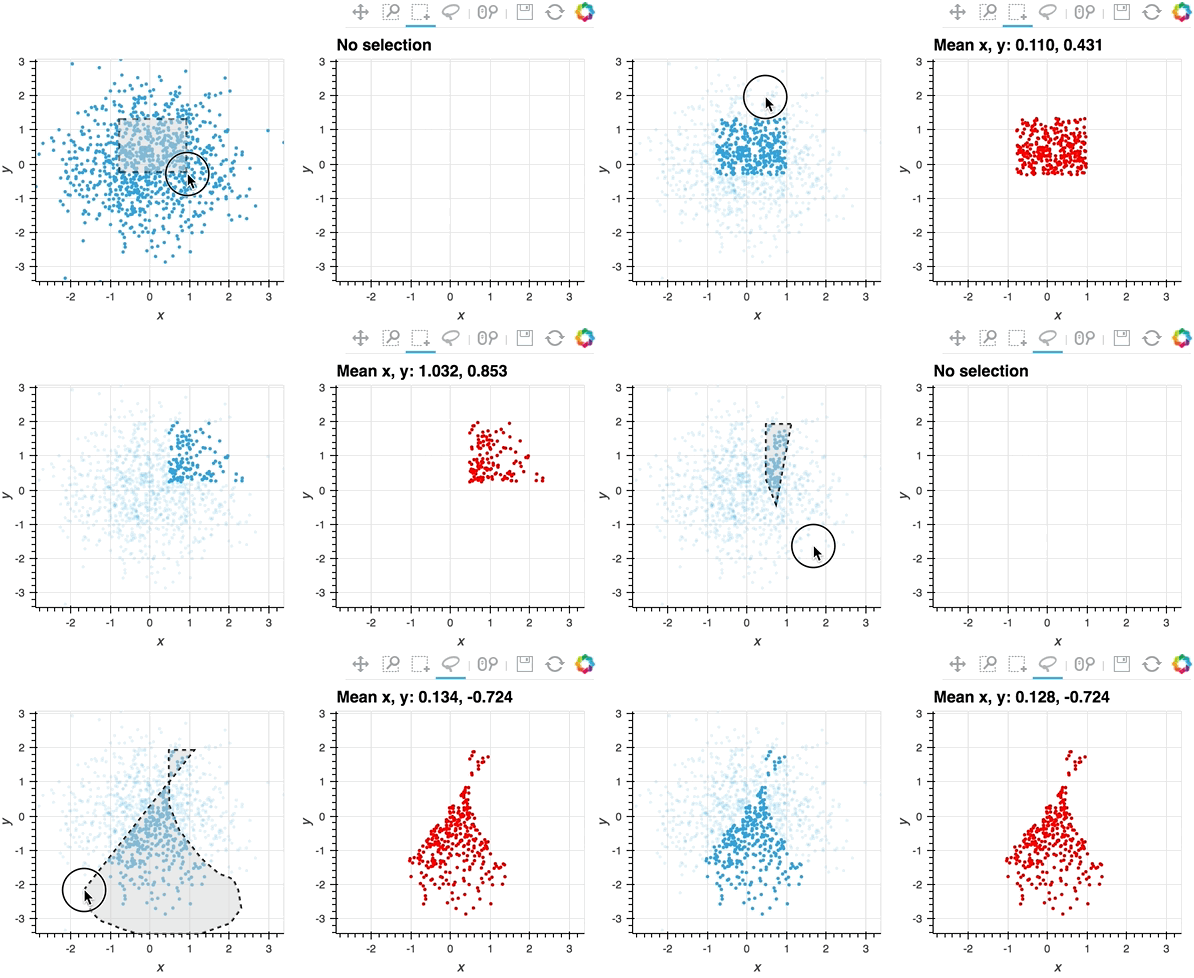
"Here we will create a small interactive plot, using [Linked Streams](./12-Custom_Interactivity.ipynb), which mirrors the points selected using box- and lasso-select tools in a second plot and computes some statistics:"
]
},
{
"cell_type": "code",
"execution_count": null,
"metadata": {},
"outputs": [],
"source": [
"%%opts Points [tools=['box_select', 'lasso_select']]\n",
"\n",
"# Declare some points\n",
"points = hv.Points(np.random.randn(1000,2 ))\n",
"\n",
"# Declare points as source of selection stream\n",
"selection = hv.streams.Selection1D(source=points)\n",
"\n",
"# Write function that uses the selection indices to slice points and compute stats\n",
"def selected_info(index):\n",
" arr = points.array()[index]\n",
" if index:\n",
" label = 'Mean x, y: %.3f, %.3f' % tuple(arr.mean(axis=0))\n",
" else:\n",
" label = 'No selection'\n",
" return points.clone(arr, label=label).options(color='red')\n",
"\n",
"# Combine points and DynamicMap\n",
"layout = points + hv.DynamicMap(selected_info, streams=[selection])\n",
"layout"
]
},
{
"cell_type": "markdown",
"metadata": {},
"source": [
" "
]
},
{
"cell_type": "markdown",
"metadata": {},
"source": [
"#### Working with the BokehRenderer\n",
"\n",
"When working with Bokeh server or wanting to manipulate a backend specific plot object you will have to use a HoloViews ``Renderer`` directly to convert the HoloViews object into the backend specific representation. Therefore we will start by getting a hold of a ``BokehRenderer``:"
]
},
{
"cell_type": "code",
"execution_count": null,
"metadata": {},
"outputs": [],
"source": [
"renderer = hv.renderer('bokeh')\n",
"print(renderer)"
]
},
{
"cell_type": "markdown",
"metadata": {},
"source": [
"```python\n",
"BokehRenderer()\n",
"```"
]
},
{
"cell_type": "markdown",
"metadata": {},
"source": [
"All ``Renderer`` classes in HoloViews are so called ParameterizedFunctions; they provide both classmethods and instance methods to render an object. You can easily create a new ``Renderer`` instance using the ``.instance`` method:"
]
},
{
"cell_type": "code",
"execution_count": null,
"metadata": {},
"outputs": [],
"source": [
"renderer = renderer.instance(mode='server')"
]
},
{
"cell_type": "markdown",
"metadata": {},
"source": [
"Renderers can also have different modes. In this case we will instantiate the renderer in ``'server'`` mode, which tells the Renderer to render the HoloViews object to a format that can easily be deployed as a server app. Before going into more detail about deploying server apps we will quickly remind ourselves how the renderer turns HoloViews objects into Bokeh models."
]
},
{
"cell_type": "markdown",
"metadata": {},
"source": [
"### Figures\n",
"\n",
"The BokehRenderer converts the HoloViews object to a HoloViews ``Plot``, which holds the Bokeh models that will be rendered to screen. As a very simple example we can convert a HoloViews ``Image`` to a HoloViews plot:"
]
},
{
"cell_type": "code",
"execution_count": null,
"metadata": {},
"outputs": [],
"source": [
"hvplot = renderer.get_plot(layout)\n",
"print(hvplot)"
]
},
{
"cell_type": "markdown",
"metadata": {},
"source": [
"```\n",
"\n",
"```"
]
},
{
"cell_type": "markdown",
"metadata": {},
"source": [
"Using the ``state`` attribute on the HoloViews plot we can access the Bokeh ``Column`` model, which we can then work with directly."
]
},
{
"cell_type": "code",
"execution_count": null,
"metadata": {},
"outputs": [],
"source": [
"hvplot.state"
]
},
{
"cell_type": "markdown",
"metadata": {},
"source": [
"**Column**(\tid = '5a8b7949-decd-4a96-b1f8-8f77ec90e5bf', …)\n"
]
},
{
"cell_type": "markdown",
"metadata": {},
"source": [
"In the background this is how HoloViews converts any HoloViews object into Bokeh models, which can then be converted to embeddable or standalone HTML and be rendered in the browser. This conversion is usually done in the background using the ``figure_data`` method:"
]
},
{
"cell_type": "code",
"execution_count": null,
"metadata": {},
"outputs": [],
"source": [
"html = renderer._figure_data(hvplot)"
]
},
{
"cell_type": "markdown",
"metadata": {},
"source": [
"### Bokeh Documents\n",
"\n",
"In Bokeh the [``Document``](http://bokeh.pydata.org/en/latest/docs/reference/document.html) is the basic unit at which Bokeh models (such as plots, layouts and widgets) are held and serialized. The serialized JSON representation is then sent to BokehJS on the client-side browser. When in ``'server'`` mode the BokehRenderer will automatically return a server Document:"
]
},
{
"cell_type": "code",
"execution_count": null,
"metadata": {},
"outputs": [],
"source": [
"renderer(layout)"
]
},
{
"cell_type": "markdown",
"metadata": {},
"source": [
"```\n",
"(,\n",
" {'file-ext': 'html', 'mime_type': u'text/html'})\n",
"```"
]
},
{
"cell_type": "markdown",
"metadata": {},
"source": [
"We can also easily use the ``server_doc`` method to get a Bokeh ``Document``, which does not require you to make an instance in 'server' mode."
]
},
{
"cell_type": "code",
"execution_count": null,
"metadata": {},
"outputs": [],
"source": [
"doc = renderer.server_doc(layout)\n",
"doc.title = 'HoloViews App'"
]
},
{
"cell_type": "markdown",
"metadata": {},
"source": [
"## Deploying with ``bokeh serve``"
]
},
{
"cell_type": "markdown",
"metadata": {},
"source": [
"Deployment from a script with `bokeh serve` is one of the most common ways to deploy a Bokeh app. Any ``.py`` or ``.ipynb`` file that attaches a plot to Bokeh's ``curdoc`` can be deployed using ``bokeh serve``. The easiest way to do this is using the ``BokehRenderer.server_doc`` method, which accepts any HoloViews object generates the appropriate Bokeh models and then attaches them to ``curdoc``. See below to see a full standalone script:"
]
},
{
"cell_type": "markdown",
"metadata": {},
"source": [
"```python\n",
"import numpy as np\n",
"import holoviews as hv\n",
"import holoviews.plotting.bokeh\n",
"\n",
"renderer = hv.renderer('bokeh')\n",
"\n",
"points = hv.Points(np.random.randn(1000,2 )).options(tools=['box_select', 'lasso_select'])\n",
"selection = hv.streams.Selection1D(source=points)\n",
"\n",
"def selected_info(index):\n",
" arr = points.array()[index]\n",
" if index:\n",
" label = 'Mean x, y: %.3f, %.3f' % tuple(arr.mean(axis=0))\n",
" else:\n",
" label = 'No selection'\n",
" return points.clone(arr, label=label).options(color='red')\n",
"\n",
"layout = points + hv.DynamicMap(selected_info, streams=[selection])\n",
"\n",
"doc = renderer.server_doc(layout)\n",
"doc.title = 'HoloViews App'\n",
"```"
]
},
{
"cell_type": "markdown",
"metadata": {},
"source": [
"In just a few steps, i.e. by our plot to a Document ``renderer.server_doc`` we have gone from an interactive plot which we can iteratively refine in the notebook to a deployable Bokeh app. Note also that we can also deploy an app directly from a notebook. By adding ``BokehRenderer.server_doc(holoviews_object)`` to the end of the notebook any regular ``.ipynb`` file can be made into a valid Bokeh app, which can be served with ``bokeh serve example.ipynb``.\n",
"\n",
"In addition to starting a server from a script we can also start up a server interactively, so let's do a quick deep dive into Bokeh ``Application`` and ``Server`` objects and how we can work with them from within HoloViews."
]
},
{
"cell_type": "markdown",
"metadata": {},
"source": [
"## Bokeh Applications and Server\n",
"\n",
"A Bokeh ``Application`` encapsulates a Document and allows it to be deployed on a Bokeh server. The ``BokehRenderer.app`` method provides an easy way to create an ``Application`` and either display it immediately in a notebook or manually include it in a server app.\n",
"\n",
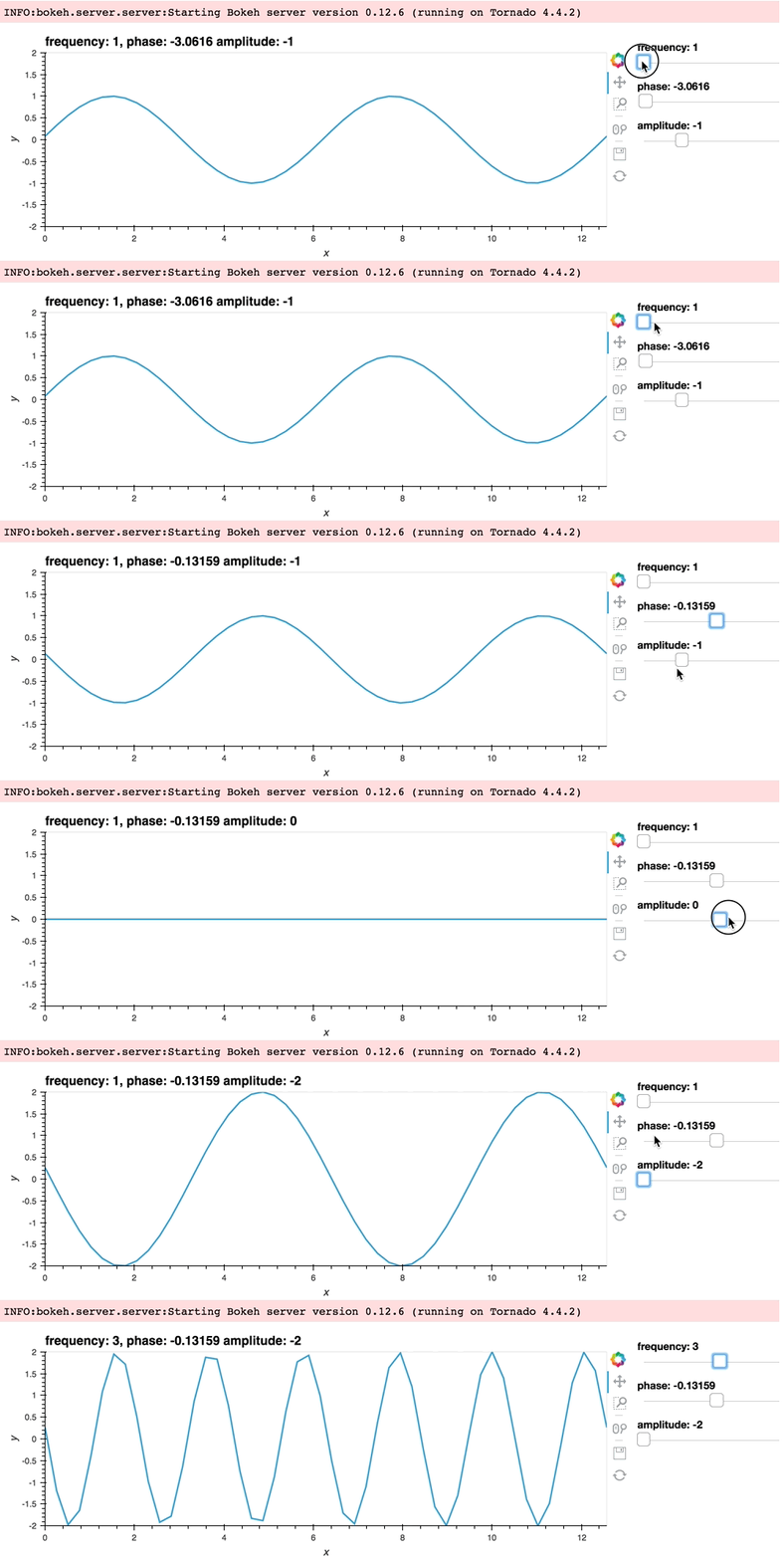
"To let us try this out we'll define a slightly simpler plot to deploy as a server app. We'll define a ``DynamicMap`` of a sine ``Curve`` varying by frequency, phase and an offset."
]
},
{
"cell_type": "code",
"execution_count": null,
"metadata": {},
"outputs": [],
"source": [
"def sine(frequency, phase, amplitude):\n",
" xs = np.linspace(0, np.pi*4)\n",
" return hv.Curve((xs, np.sin(frequency*xs+phase)*amplitude)).options(width=800)\n",
"\n",
"ranges = dict(frequency=(1, 5), phase=(-np.pi, np.pi), amplitude=(-2, 2), y=(-2, 2))\n",
"dmap = hv.DynamicMap(sine, kdims=['frequency', 'phase', 'amplitude']).redim.range(**ranges)\n",
"\n",
"app = renderer.app(dmap)\n",
"print(app)"
]
},
{
"cell_type": "markdown",
"metadata": {},
"source": [
"```\n",
"\n",
"```"
]
},
{
"cell_type": "markdown",
"metadata": {},
"source": [
"Once we have a Bokeh Application we can manually create a ``Server`` instance to deploy it. To start a ``Server`` instance we simply define a mapping between the URL paths and apps that we want to deploy. Additionally we define a port (defining ``port=0`` will use any open port)."
]
},
{
"cell_type": "code",
"execution_count": null,
"metadata": {},
"outputs": [],
"source": [
"from bokeh.server.server import Server\n",
"\n",
"server = Server({'/': app}, port=0)"
]
},
{
"cell_type": "markdown",
"metadata": {},
"source": [
"Next we can define a callback on the IOLoop that will open the server app in a new browser window and actually start the app (and if outside the notebook the IOLoop):"
]
},
{
"cell_type": "code",
"execution_count": null,
"metadata": {},
"outputs": [],
"source": [
"server.start()\n",
"server.show('/')\n",
"\n",
"# Outside the notebook ioloop needs to be started\n",
"# from tornado.ioloop import IOLoop\n",
"# loop = IOLoop.current()\n",
"# loop.start() "
]
},
{
"cell_type": "markdown",
"metadata": {},
"source": [
"After running the cell above you should have noticed a new browser window popping up displaying our plot. Once you are done playing with it you can stop it with:"
]
},
{
"cell_type": "code",
"execution_count": null,
"metadata": {},
"outputs": [],
"source": [
"server.stop()"
]
},
{
"cell_type": "markdown",
"metadata": {},
"source": [
"The ``BokehRenderer.app`` method allows us to the same thing automatically (but less flexibly) using the ``show=True`` and ``new_window=True`` arguments:"
]
},
{
"cell_type": "code",
"execution_count": null,
"metadata": {},
"outputs": [],
"source": [
"server = renderer.app(dmap, show=True, new_window=True)"
]
},
{
"cell_type": "markdown",
"metadata": {},
"source": [
"
"
]
},
{
"cell_type": "markdown",
"metadata": {},
"source": [
"#### Working with the BokehRenderer\n",
"\n",
"When working with Bokeh server or wanting to manipulate a backend specific plot object you will have to use a HoloViews ``Renderer`` directly to convert the HoloViews object into the backend specific representation. Therefore we will start by getting a hold of a ``BokehRenderer``:"
]
},
{
"cell_type": "code",
"execution_count": null,
"metadata": {},
"outputs": [],
"source": [
"renderer = hv.renderer('bokeh')\n",
"print(renderer)"
]
},
{
"cell_type": "markdown",
"metadata": {},
"source": [
"```python\n",
"BokehRenderer()\n",
"```"
]
},
{
"cell_type": "markdown",
"metadata": {},
"source": [
"All ``Renderer`` classes in HoloViews are so called ParameterizedFunctions; they provide both classmethods and instance methods to render an object. You can easily create a new ``Renderer`` instance using the ``.instance`` method:"
]
},
{
"cell_type": "code",
"execution_count": null,
"metadata": {},
"outputs": [],
"source": [
"renderer = renderer.instance(mode='server')"
]
},
{
"cell_type": "markdown",
"metadata": {},
"source": [
"Renderers can also have different modes. In this case we will instantiate the renderer in ``'server'`` mode, which tells the Renderer to render the HoloViews object to a format that can easily be deployed as a server app. Before going into more detail about deploying server apps we will quickly remind ourselves how the renderer turns HoloViews objects into Bokeh models."
]
},
{
"cell_type": "markdown",
"metadata": {},
"source": [
"### Figures\n",
"\n",
"The BokehRenderer converts the HoloViews object to a HoloViews ``Plot``, which holds the Bokeh models that will be rendered to screen. As a very simple example we can convert a HoloViews ``Image`` to a HoloViews plot:"
]
},
{
"cell_type": "code",
"execution_count": null,
"metadata": {},
"outputs": [],
"source": [
"hvplot = renderer.get_plot(layout)\n",
"print(hvplot)"
]
},
{
"cell_type": "markdown",
"metadata": {},
"source": [
"```\n",
"\n",
"```"
]
},
{
"cell_type": "markdown",
"metadata": {},
"source": [
"Using the ``state`` attribute on the HoloViews plot we can access the Bokeh ``Column`` model, which we can then work with directly."
]
},
{
"cell_type": "code",
"execution_count": null,
"metadata": {},
"outputs": [],
"source": [
"hvplot.state"
]
},
{
"cell_type": "markdown",
"metadata": {},
"source": [
"**Column**(\tid = '5a8b7949-decd-4a96-b1f8-8f77ec90e5bf', …)\n"
]
},
{
"cell_type": "markdown",
"metadata": {},
"source": [
"In the background this is how HoloViews converts any HoloViews object into Bokeh models, which can then be converted to embeddable or standalone HTML and be rendered in the browser. This conversion is usually done in the background using the ``figure_data`` method:"
]
},
{
"cell_type": "code",
"execution_count": null,
"metadata": {},
"outputs": [],
"source": [
"html = renderer._figure_data(hvplot)"
]
},
{
"cell_type": "markdown",
"metadata": {},
"source": [
"### Bokeh Documents\n",
"\n",
"In Bokeh the [``Document``](http://bokeh.pydata.org/en/latest/docs/reference/document.html) is the basic unit at which Bokeh models (such as plots, layouts and widgets) are held and serialized. The serialized JSON representation is then sent to BokehJS on the client-side browser. When in ``'server'`` mode the BokehRenderer will automatically return a server Document:"
]
},
{
"cell_type": "code",
"execution_count": null,
"metadata": {},
"outputs": [],
"source": [
"renderer(layout)"
]
},
{
"cell_type": "markdown",
"metadata": {},
"source": [
"```\n",
"(,\n",
" {'file-ext': 'html', 'mime_type': u'text/html'})\n",
"```"
]
},
{
"cell_type": "markdown",
"metadata": {},
"source": [
"We can also easily use the ``server_doc`` method to get a Bokeh ``Document``, which does not require you to make an instance in 'server' mode."
]
},
{
"cell_type": "code",
"execution_count": null,
"metadata": {},
"outputs": [],
"source": [
"doc = renderer.server_doc(layout)\n",
"doc.title = 'HoloViews App'"
]
},
{
"cell_type": "markdown",
"metadata": {},
"source": [
"## Deploying with ``bokeh serve``"
]
},
{
"cell_type": "markdown",
"metadata": {},
"source": [
"Deployment from a script with `bokeh serve` is one of the most common ways to deploy a Bokeh app. Any ``.py`` or ``.ipynb`` file that attaches a plot to Bokeh's ``curdoc`` can be deployed using ``bokeh serve``. The easiest way to do this is using the ``BokehRenderer.server_doc`` method, which accepts any HoloViews object generates the appropriate Bokeh models and then attaches them to ``curdoc``. See below to see a full standalone script:"
]
},
{
"cell_type": "markdown",
"metadata": {},
"source": [
"```python\n",
"import numpy as np\n",
"import holoviews as hv\n",
"import holoviews.plotting.bokeh\n",
"\n",
"renderer = hv.renderer('bokeh')\n",
"\n",
"points = hv.Points(np.random.randn(1000,2 )).options(tools=['box_select', 'lasso_select'])\n",
"selection = hv.streams.Selection1D(source=points)\n",
"\n",
"def selected_info(index):\n",
" arr = points.array()[index]\n",
" if index:\n",
" label = 'Mean x, y: %.3f, %.3f' % tuple(arr.mean(axis=0))\n",
" else:\n",
" label = 'No selection'\n",
" return points.clone(arr, label=label).options(color='red')\n",
"\n",
"layout = points + hv.DynamicMap(selected_info, streams=[selection])\n",
"\n",
"doc = renderer.server_doc(layout)\n",
"doc.title = 'HoloViews App'\n",
"```"
]
},
{
"cell_type": "markdown",
"metadata": {},
"source": [
"In just a few steps, i.e. by our plot to a Document ``renderer.server_doc`` we have gone from an interactive plot which we can iteratively refine in the notebook to a deployable Bokeh app. Note also that we can also deploy an app directly from a notebook. By adding ``BokehRenderer.server_doc(holoviews_object)`` to the end of the notebook any regular ``.ipynb`` file can be made into a valid Bokeh app, which can be served with ``bokeh serve example.ipynb``.\n",
"\n",
"In addition to starting a server from a script we can also start up a server interactively, so let's do a quick deep dive into Bokeh ``Application`` and ``Server`` objects and how we can work with them from within HoloViews."
]
},
{
"cell_type": "markdown",
"metadata": {},
"source": [
"## Bokeh Applications and Server\n",
"\n",
"A Bokeh ``Application`` encapsulates a Document and allows it to be deployed on a Bokeh server. The ``BokehRenderer.app`` method provides an easy way to create an ``Application`` and either display it immediately in a notebook or manually include it in a server app.\n",
"\n",
"To let us try this out we'll define a slightly simpler plot to deploy as a server app. We'll define a ``DynamicMap`` of a sine ``Curve`` varying by frequency, phase and an offset."
]
},
{
"cell_type": "code",
"execution_count": null,
"metadata": {},
"outputs": [],
"source": [
"def sine(frequency, phase, amplitude):\n",
" xs = np.linspace(0, np.pi*4)\n",
" return hv.Curve((xs, np.sin(frequency*xs+phase)*amplitude)).options(width=800)\n",
"\n",
"ranges = dict(frequency=(1, 5), phase=(-np.pi, np.pi), amplitude=(-2, 2), y=(-2, 2))\n",
"dmap = hv.DynamicMap(sine, kdims=['frequency', 'phase', 'amplitude']).redim.range(**ranges)\n",
"\n",
"app = renderer.app(dmap)\n",
"print(app)"
]
},
{
"cell_type": "markdown",
"metadata": {},
"source": [
"```\n",
"\n",
"```"
]
},
{
"cell_type": "markdown",
"metadata": {},
"source": [
"Once we have a Bokeh Application we can manually create a ``Server`` instance to deploy it. To start a ``Server`` instance we simply define a mapping between the URL paths and apps that we want to deploy. Additionally we define a port (defining ``port=0`` will use any open port)."
]
},
{
"cell_type": "code",
"execution_count": null,
"metadata": {},
"outputs": [],
"source": [
"from bokeh.server.server import Server\n",
"\n",
"server = Server({'/': app}, port=0)"
]
},
{
"cell_type": "markdown",
"metadata": {},
"source": [
"Next we can define a callback on the IOLoop that will open the server app in a new browser window and actually start the app (and if outside the notebook the IOLoop):"
]
},
{
"cell_type": "code",
"execution_count": null,
"metadata": {},
"outputs": [],
"source": [
"server.start()\n",
"server.show('/')\n",
"\n",
"# Outside the notebook ioloop needs to be started\n",
"# from tornado.ioloop import IOLoop\n",
"# loop = IOLoop.current()\n",
"# loop.start() "
]
},
{
"cell_type": "markdown",
"metadata": {},
"source": [
"After running the cell above you should have noticed a new browser window popping up displaying our plot. Once you are done playing with it you can stop it with:"
]
},
{
"cell_type": "code",
"execution_count": null,
"metadata": {},
"outputs": [],
"source": [
"server.stop()"
]
},
{
"cell_type": "markdown",
"metadata": {},
"source": [
"The ``BokehRenderer.app`` method allows us to the same thing automatically (but less flexibly) using the ``show=True`` and ``new_window=True`` arguments:"
]
},
{
"cell_type": "code",
"execution_count": null,
"metadata": {},
"outputs": [],
"source": [
"server = renderer.app(dmap, show=True, new_window=True)"
]
},
{
"cell_type": "markdown",
"metadata": {},
"source": [
" "
]
},
{
"cell_type": "markdown",
"metadata": {},
"source": [
"We will once again stop this Server before continuing:"
]
},
{
"cell_type": "code",
"execution_count": null,
"metadata": {},
"outputs": [],
"source": [
"server.stop()"
]
},
{
"cell_type": "markdown",
"metadata": {},
"source": [
"## Inlining apps in the notebook"
]
},
{
"cell_type": "markdown",
"metadata": {},
"source": [
"Instead of displaying our app in a new browser window and manually creating a ``Server`` instance we can also display an app inline in the notebook simply by supplying the ``show=True`` argument to the ``BokehRenderer.app`` method. The server app will be killed whenever you rerun or delete the cell that contains the output. Additionally, if your Jupyter Notebook server is not running on the default address or port (``localhost:8888``) supply the websocket origin, which should match the first part of the URL of your notebook:"
]
},
{
"cell_type": "code",
"execution_count": null,
"metadata": {},
"outputs": [],
"source": [
"renderer.app(dmap, show=True, websocket_origin='localhost:8888')"
]
},
{
"cell_type": "markdown",
"metadata": {},
"source": [
"
"
]
},
{
"cell_type": "markdown",
"metadata": {},
"source": [
"We will once again stop this Server before continuing:"
]
},
{
"cell_type": "code",
"execution_count": null,
"metadata": {},
"outputs": [],
"source": [
"server.stop()"
]
},
{
"cell_type": "markdown",
"metadata": {},
"source": [
"## Inlining apps in the notebook"
]
},
{
"cell_type": "markdown",
"metadata": {},
"source": [
"Instead of displaying our app in a new browser window and manually creating a ``Server`` instance we can also display an app inline in the notebook simply by supplying the ``show=True`` argument to the ``BokehRenderer.app`` method. The server app will be killed whenever you rerun or delete the cell that contains the output. Additionally, if your Jupyter Notebook server is not running on the default address or port (``localhost:8888``) supply the websocket origin, which should match the first part of the URL of your notebook:"
]
},
{
"cell_type": "code",
"execution_count": null,
"metadata": {},
"outputs": [],
"source": [
"renderer.app(dmap, show=True, websocket_origin='localhost:8888')"
]
},
{
"cell_type": "markdown",
"metadata": {},
"source": [
" "
]
},
{
"cell_type": "markdown",
"metadata": {},
"source": [
"## Periodic callbacks\n",
"\n",
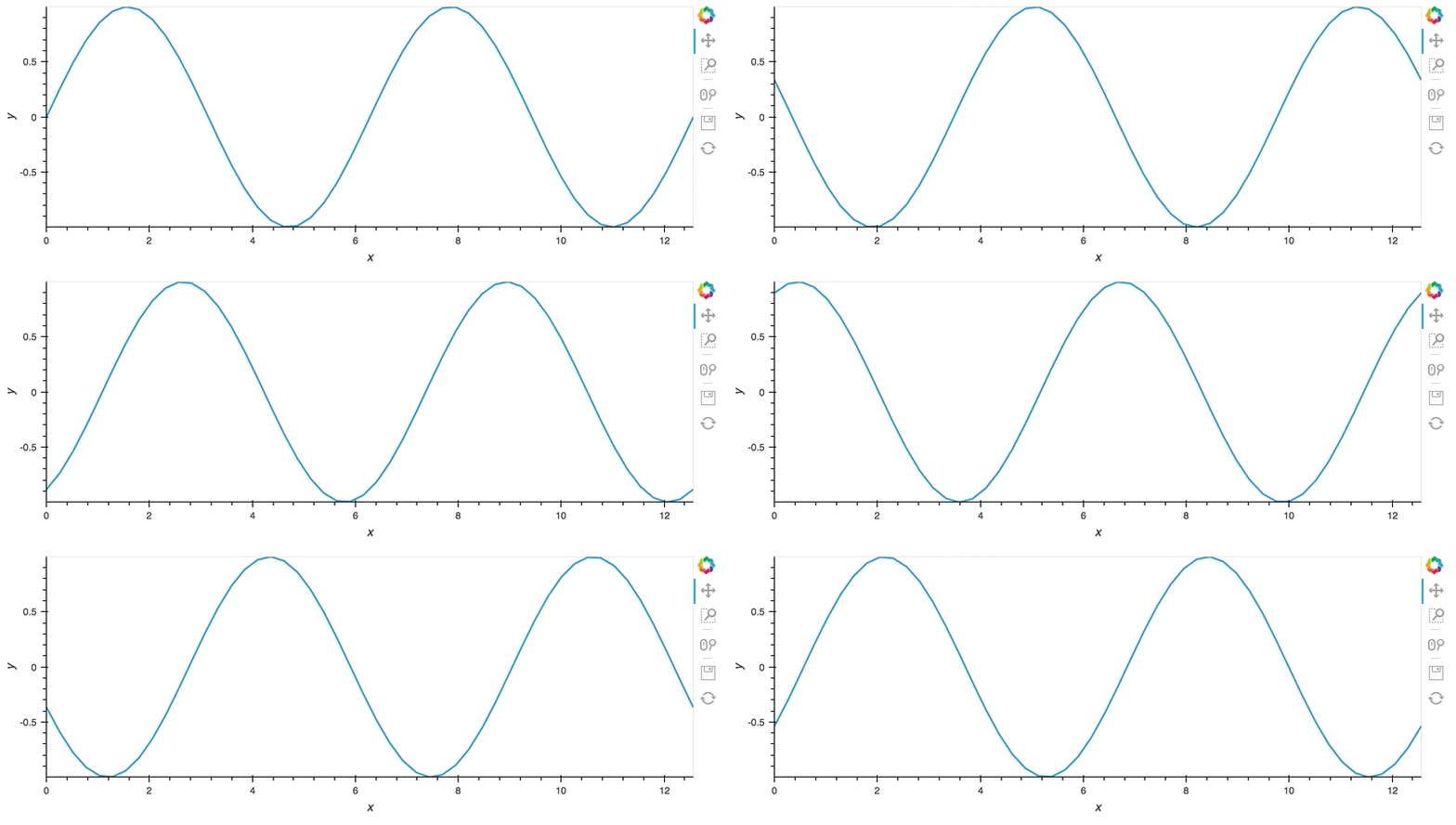
"One of the most important features of deploying apps is the ability to attach asynchronous, periodic callbacks, which update the plot. The simplest way of achieving this is to attach a ``Counter`` stream on the plot which is incremented on each callback. As a simple demo we'll simply compute a phase offset from the counter value, animating the sine wave:"
]
},
{
"cell_type": "code",
"execution_count": null,
"metadata": {},
"outputs": [],
"source": [
"def sine(counter):\n",
" phase = counter*0.1%np.pi*2\n",
" xs = np.linspace(0, np.pi*4)\n",
" return hv.Curve((xs, np.sin(xs+phase))).options(width=800)\n",
"\n",
"dmap = hv.DynamicMap(sine, streams=[hv.streams.Counter()])\n",
"\n",
"app = renderer.app(dmap, show=True, websocket_origin='localhost:8888')"
]
},
{
"cell_type": "markdown",
"metadata": {},
"source": [
"
"
]
},
{
"cell_type": "markdown",
"metadata": {},
"source": [
"## Periodic callbacks\n",
"\n",
"One of the most important features of deploying apps is the ability to attach asynchronous, periodic callbacks, which update the plot. The simplest way of achieving this is to attach a ``Counter`` stream on the plot which is incremented on each callback. As a simple demo we'll simply compute a phase offset from the counter value, animating the sine wave:"
]
},
{
"cell_type": "code",
"execution_count": null,
"metadata": {},
"outputs": [],
"source": [
"def sine(counter):\n",
" phase = counter*0.1%np.pi*2\n",
" xs = np.linspace(0, np.pi*4)\n",
" return hv.Curve((xs, np.sin(xs+phase))).options(width=800)\n",
"\n",
"dmap = hv.DynamicMap(sine, streams=[hv.streams.Counter()])\n",
"\n",
"app = renderer.app(dmap, show=True, websocket_origin='localhost:8888')"
]
},
{
"cell_type": "markdown",
"metadata": {},
"source": [
" "
]
},
{
"cell_type": "markdown",
"metadata": {},
"source": [
"Once we have created the app we can start a periodic callback with the ``periodic`` method on the ``DynamicMap``. The first argument to the method is the period and the second argument the number of executions to trigger (we can set this value to ``None`` to set up an indefinite callback). As soon as we start this callback you should see the Curve above become animated."
]
},
{
"cell_type": "code",
"execution_count": null,
"metadata": {},
"outputs": [],
"source": [
"dmap.periodic(0.1, 100)"
]
},
{
"cell_type": "markdown",
"metadata": {},
"source": [
"## Combining HoloViews and Bokeh Plots/Widgets"
]
},
{
"cell_type": "markdown",
"metadata": {},
"source": [
"While HoloViews provides very convenient ways of creating an app it is not as fully featured as Bokeh itself is. Therefore we often want to extend a HoloViews based app with Bokeh plots and widgets created directly using the Bokeh API. Using the ``BokehRenderer`` we can easily convert a HoloViews object into a Bokeh model, which we can combine with other Bokeh models as desired.\n",
"\n",
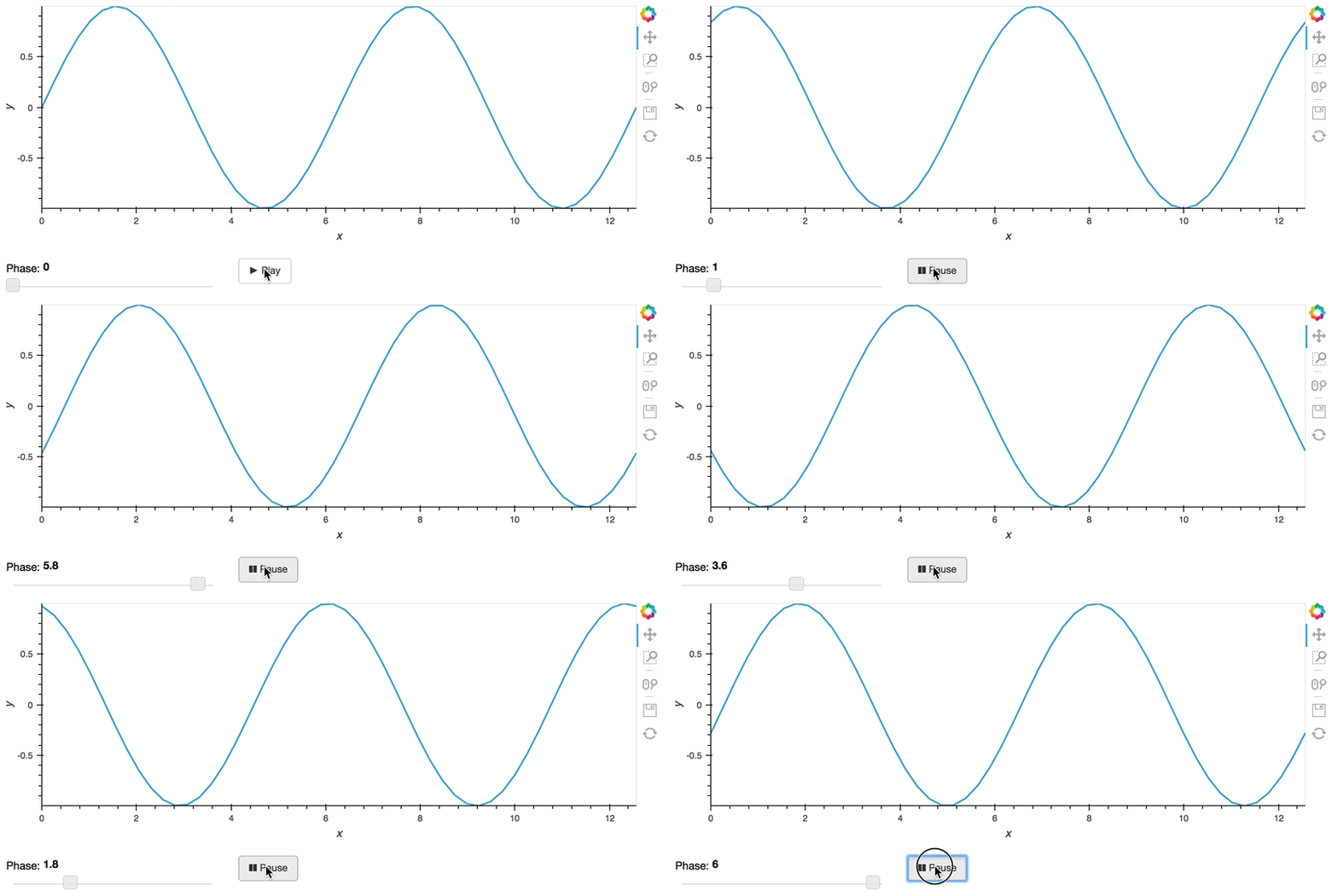
"To see what this looks like we will use the sine example again but this time connect a [Stream](./11-Responding_to_Events.ipynb) to a manually created Bokeh slider widget and play button. To display this in the notebook we will reuse what we learned about creating a ``Server`` instance using a ``FunctionHandler``, you can of course run this in a script by calling the ``modify_doc`` function with with the ``Document`` returned by the Bokeh ``curdoc()`` function."
]
},
{
"cell_type": "code",
"execution_count": null,
"metadata": {},
"outputs": [],
"source": [
"import numpy as np\n",
"import holoviews as hv\n",
"\n",
"from bokeh.io import show\n",
"from bokeh.layouts import layout\n",
"from bokeh.models import Slider, Button\n",
"\n",
"renderer = hv.renderer('bokeh').instance(mode='server')\n",
"\n",
"# Create the holoviews app again\n",
"def sine(phase):\n",
" xs = np.linspace(0, np.pi*4)\n",
" return hv.Curve((xs, np.sin(xs+phase))).options(width=800)\n",
"\n",
"stream = hv.streams.Stream.define('Phase', phase=0.)()\n",
"dmap = hv.DynamicMap(sine, streams=[stream])\n",
"\n",
"# Define valid function for FunctionHandler\n",
"# when deploying as script, simply attach to curdoc\n",
"def modify_doc(doc):\n",
" # Create HoloViews plot and attach the document\n",
" hvplot = renderer.get_plot(dmap, doc)\n",
"\n",
" # Create a slider and play buttons\n",
" def animate_update():\n",
" year = slider.value + 0.2\n",
" if year > end:\n",
" year = start\n",
" slider.value = year\n",
"\n",
" def slider_update(attrname, old, new):\n",
" # Notify the HoloViews stream of the slider update \n",
" stream.event(phase=new)\n",
" \n",
" start, end = 0, np.pi*2\n",
" slider = Slider(start=start, end=end, value=start, step=0.2, title=\"Phase\")\n",
" slider.on_change('value', slider_update)\n",
" \n",
" callback_id = None\n",
"\n",
" def animate():\n",
" global callback_id\n",
" if button.label == '► Play':\n",
" button.label = '❚❚ Pause'\n",
" callback_id = doc.add_periodic_callback(animate_update, 50)\n",
" else:\n",
" button.label = '► Play'\n",
" doc.remove_periodic_callback(callback_id)\n",
" button = Button(label='► Play', width=60)\n",
" button.on_click(animate)\n",
" \n",
" # Combine the holoviews plot and widgets in a layout\n",
" plot = layout([\n",
" [hvplot.state],\n",
" [slider, button]], sizing_mode='fixed')\n",
" \n",
" doc.add_root(plot)\n",
" return doc\n",
"\n",
"# To display in the notebook\n",
"show(modify_doc, notebook_url='localhost:8888')\n",
"\n",
"# To display in a script\n",
"# doc = modify_doc(curdoc()) "
]
},
{
"cell_type": "markdown",
"metadata": {},
"source": [
"
"
]
},
{
"cell_type": "markdown",
"metadata": {},
"source": [
"Once we have created the app we can start a periodic callback with the ``periodic`` method on the ``DynamicMap``. The first argument to the method is the period and the second argument the number of executions to trigger (we can set this value to ``None`` to set up an indefinite callback). As soon as we start this callback you should see the Curve above become animated."
]
},
{
"cell_type": "code",
"execution_count": null,
"metadata": {},
"outputs": [],
"source": [
"dmap.periodic(0.1, 100)"
]
},
{
"cell_type": "markdown",
"metadata": {},
"source": [
"## Combining HoloViews and Bokeh Plots/Widgets"
]
},
{
"cell_type": "markdown",
"metadata": {},
"source": [
"While HoloViews provides very convenient ways of creating an app it is not as fully featured as Bokeh itself is. Therefore we often want to extend a HoloViews based app with Bokeh plots and widgets created directly using the Bokeh API. Using the ``BokehRenderer`` we can easily convert a HoloViews object into a Bokeh model, which we can combine with other Bokeh models as desired.\n",
"\n",
"To see what this looks like we will use the sine example again but this time connect a [Stream](./11-Responding_to_Events.ipynb) to a manually created Bokeh slider widget and play button. To display this in the notebook we will reuse what we learned about creating a ``Server`` instance using a ``FunctionHandler``, you can of course run this in a script by calling the ``modify_doc`` function with with the ``Document`` returned by the Bokeh ``curdoc()`` function."
]
},
{
"cell_type": "code",
"execution_count": null,
"metadata": {},
"outputs": [],
"source": [
"import numpy as np\n",
"import holoviews as hv\n",
"\n",
"from bokeh.io import show\n",
"from bokeh.layouts import layout\n",
"from bokeh.models import Slider, Button\n",
"\n",
"renderer = hv.renderer('bokeh').instance(mode='server')\n",
"\n",
"# Create the holoviews app again\n",
"def sine(phase):\n",
" xs = np.linspace(0, np.pi*4)\n",
" return hv.Curve((xs, np.sin(xs+phase))).options(width=800)\n",
"\n",
"stream = hv.streams.Stream.define('Phase', phase=0.)()\n",
"dmap = hv.DynamicMap(sine, streams=[stream])\n",
"\n",
"# Define valid function for FunctionHandler\n",
"# when deploying as script, simply attach to curdoc\n",
"def modify_doc(doc):\n",
" # Create HoloViews plot and attach the document\n",
" hvplot = renderer.get_plot(dmap, doc)\n",
"\n",
" # Create a slider and play buttons\n",
" def animate_update():\n",
" year = slider.value + 0.2\n",
" if year > end:\n",
" year = start\n",
" slider.value = year\n",
"\n",
" def slider_update(attrname, old, new):\n",
" # Notify the HoloViews stream of the slider update \n",
" stream.event(phase=new)\n",
" \n",
" start, end = 0, np.pi*2\n",
" slider = Slider(start=start, end=end, value=start, step=0.2, title=\"Phase\")\n",
" slider.on_change('value', slider_update)\n",
" \n",
" callback_id = None\n",
"\n",
" def animate():\n",
" global callback_id\n",
" if button.label == '► Play':\n",
" button.label = '❚❚ Pause'\n",
" callback_id = doc.add_periodic_callback(animate_update, 50)\n",
" else:\n",
" button.label = '► Play'\n",
" doc.remove_periodic_callback(callback_id)\n",
" button = Button(label='► Play', width=60)\n",
" button.on_click(animate)\n",
" \n",
" # Combine the holoviews plot and widgets in a layout\n",
" plot = layout([\n",
" [hvplot.state],\n",
" [slider, button]], sizing_mode='fixed')\n",
" \n",
" doc.add_root(plot)\n",
" return doc\n",
"\n",
"# To display in the notebook\n",
"show(modify_doc, notebook_url='localhost:8888')\n",
"\n",
"# To display in a script\n",
"# doc = modify_doc(curdoc()) "
]
},
{
"cell_type": "markdown",
"metadata": {},
"source": [
" "
]
},
{
"cell_type": "markdown",
"metadata": {},
"source": [
"If you had trouble following the last example, you will have noticed how verbose things can get when we drop down to the Bokeh API. The ability to customize the plot comes at the cost of additional complexity. However when we need it, the additional flexibility of composing plots manually is there."
]
}
],
"metadata": {
"language_info": {
"name": "python",
"pygments_lexer": "ipython3"
}
},
"nbformat": 4,
"nbformat_minor": 2
}
"
]
},
{
"cell_type": "markdown",
"metadata": {},
"source": [
"If you had trouble following the last example, you will have noticed how verbose things can get when we drop down to the Bokeh API. The ability to customize the plot comes at the cost of additional complexity. However when we need it, the additional flexibility of composing plots manually is there."
]
}
],
"metadata": {
"language_info": {
"name": "python",
"pygments_lexer": "ipython3"
}
},
"nbformat": 4,
"nbformat_minor": 2
}